Native AI Engine

Take control of your schedule.
Skip the manual data entry.

Turn scattered text messages, emails, and itineraries into instantly scheduled Apple Calendar events. Save hours of manual typing while keeping your personal data entirely on your device.
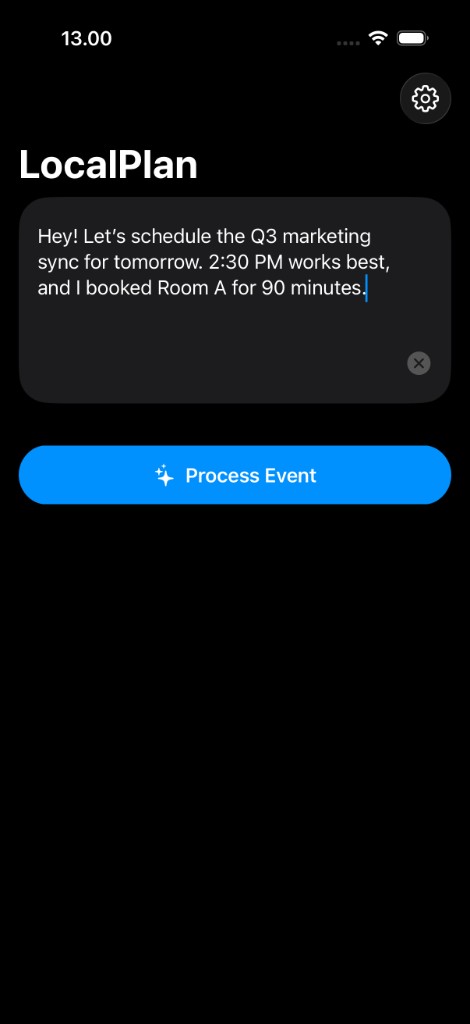
LocalPlan app showing natural language event processing

Frictionless Scheduling

Gain Back Your Time

Instant Scheduling

Never type out an event again. Simply paste a message, and the intelligent engine instantly builds a complete calendar block with dates, times, and locations.

Plan Without Friction

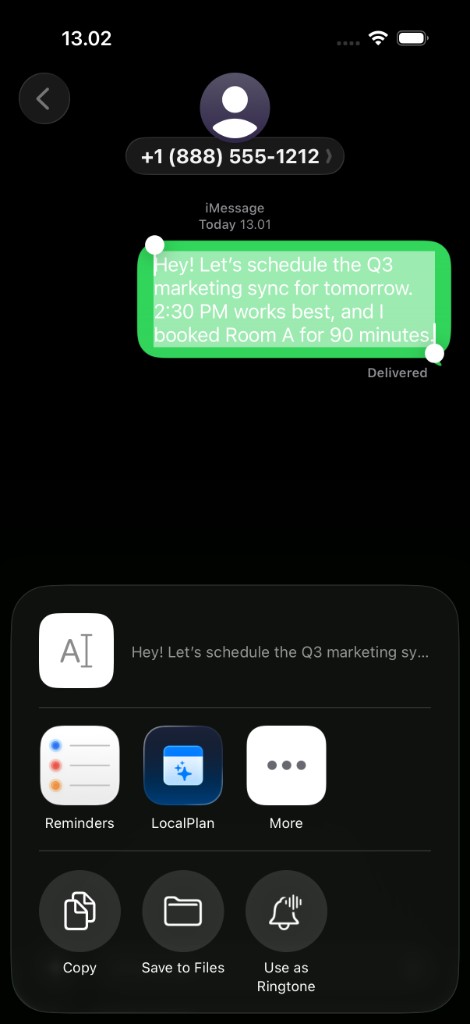
Stay in your flow. Highlight details directly in Mail or Messages and tap Share to add items to your agenda without ever switching apps.

Eliminate Tedious Formatting

Say goodbye to frustrating iOS time wheels and date-checking. Let AI handle the formatting so you can focus on actually living your day.

Seamless Integration

Capture plans exactly where they happen.

Remove the friction between making a plan and scheduling it. Turn flight itineraries, client emails, and casual texts into calendar events instantly using the native iOS Share Sheet.
  • 1
    Highlight details in Mail or Messages
  • 2
    Tap "Share" and select LocalPlan
  • 3
    Add the event to your Apple Calendar
LocalPlan in the iOS Share Sheet after selecting a message in Messages

Absolute Peace of Mind

Your schedule is your business. Your personal emails, texts, and itineraries are processed entirely on your iPhone hardware, ensuring total confidentiality.

Read our technical breakdown of zero-cloud iOS architecture →

  • Runs on Apple Foundation Models
  • Zero Cloud Servers
  • Zero Third-Party Tracking
No Subscriptions

Own Your Productivity

Reclaim your time permanently with a single purchase. Unlock the full intelligent scheduling engine with zero recurring monthly fees.

  • Unlimited AI Processing
  • No Monthly Fees
  • Single Purchase Unlock

Download includes 3 trial uses.

Get LocalPlan Pro

Frequently Asked Questions

Click to reveal answer
How does LocalPlan turn texts into calendar events?
LocalPlan uses Apple's on-device AI to read highlighted text, emails, or itineraries. Just highlight the details in Messages or Mail, tap the iOS Share Sheet, and LocalPlan instantly extracts the dates, times, and locations to create a formatted calendar event.
Is my private schedule data sent to a cloud server?
No. LocalPlan processes all text entirely on your iPhone using Apple Foundation Models. Your messages, emails, and calendar data never leave your device, ensuring complete privacy.
Does LocalPlan work with my existing Apple Calendar?
Yes. LocalPlan integrates directly with your native iOS Apple Calendar. Once the AI extracts the event details, it formats them into a standard calendar block that automatically syncs across all your Apple devices.
Do I have to pay a monthly subscription?
No. LocalPlan is free to download and includes 3 trial uses. After the trial, you can unlock unlimited AI scheduling with a single, one-time lifetime purchase. There are no recurring monthly fees.

Stop wasting time on data entry.

Start scheduling smarter and protect your daily focus.

Try 3 Parses Free